Stove Not Working After Power Outage: Troubleshooting Guide
Common causes and step-by-step fixes for a stove that won’t power on after a power outage. Learn safe diagnostics, when to call a pro, and how to prevent future outages.


If your stove isn't responding after a power outage, the most likely causes are a tripped circuit breaker, a blown fuse, or a tripped GFCI outlet. Quick fixes: reset the breaker, replace any blown fuse, and unplug-replug the range to reset its control. According to Stove Recipe Hub, start with the simplest check first to avoid unnecessary repair calls.
Understanding the impact of a power outage on your stove
A power outage can do more than stop your cooking routine; it can reset the stove's digital clock, memory presets, and safety interlocks. When power returns, a common symptom is the stove not working after power outage. The root causes are usually electrical: a tripped breaker, a blown fuse, a GFCI outlet that needs resetting, or a control board that rebooted and paused. According to Stove Recipe Hub, many modern ranges require a brief reboot to reinitialize after a surge or outage. This section explains how these systems interact and what you can safely test at home. You will learn how to distinguish between a simple reset and a more complex fault, plus how to proceed without risking your safety or warranty.
Common causes after outages
After a power outage, the most frequent culprits are on the electrical side rather than something wrong with the burner itself. Start with the simplest checks:
- Tripped circuit breaker: A surge or brief outage can trip the branch circuit that feeds the stove. If the breaker switches to the off position, flip it fully to off, then back to on.
- Blown fuse or GFCI trip: Some kitchens rely on GFCI outlets for safety. If the GFCI is tripped, the stove may lose power even if other outlets work. Reset the GFCI and test the outlet with a simple device.
- Control board reset or surge damage: The stove’s control board or ignition module can reset after a surge, causing the display to go dark or the igniter to fail to respond.
- Loose connections or damaged cord: A loose plug or a damaged power cord can cause intermittent power loss. Inspect only the external cord and outlet; internal damage should be handled by a professional.
Stove Recipe Hub analysis shows that most outages end up being simple resets, but a damaged control board or outlet can mimic a failure. If the basic resets don’t restore function, you’ll want to methodically test power at the wall and the stove.
Safety first: what not to do
When your stove is not responding after a power outage, resist the urge to poke around behind the back panel with metal tools or to force switches that feel stiff. Do not attempt permanent fixes if you smell gas or hear crackling, as that can indicate a leak or a dangerous short. If you own a gas stove, avoid lighting tests or attempting to spark ignition with open flames. Always unplug the unit from the wall before inspecting the cord or reach behind the control panel, and never work on live circuits. If you are unsure, pause and call a pro. The Stove Recipe Hub team emphasizes safety first to protect you and your home.
Quick checks you can do before calling a pro
These checks are designed to be quick, safe, and non-destructive:
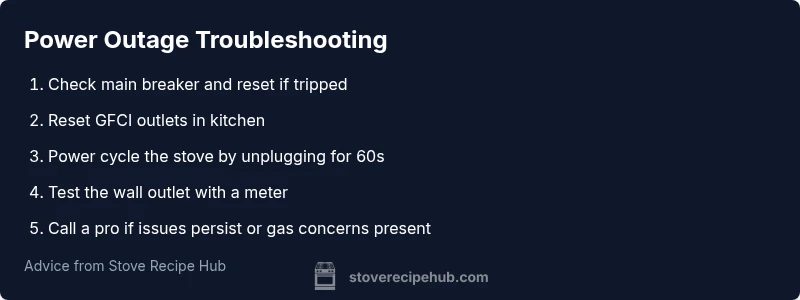
- Reset the circuit breaker: Locate your service panel, flip the stove’s breaker to off, then back to on. Wait a minute and try turning on the stove again.
- Check for a tripped GFCI: Look for a GFCI receptacle in the kitchen; press the reset button. If the outlet still has no power, move to the next check.
- Power cycle the stove: Unplug the range from the wall, wait 60 seconds, then plug it back in. This can reboot the control panel and restore normal operation.
- Test the outlet: If you have a portable appliance tester, use it to verify that the wall outlet is supplying voltage. If not, the problem may be in the outlet or the circuit.
- Inspect for obvious signs of damage: scorch marks, melted insulation, or a buzzing/whining sound require professional attention. Do not continue using the stove if you notice any hazards.
If none of these steps restore function, or if you suspect damage to wiring or the control board, it’s time to contact a licensed electrician or appliance technician. If the power outage affected a gas stove, call your gas utility or a pro before attempting any gas-related tests. The Stove Recipe Hub team reminds readers that safety and proper testing are key to a successful resolution.
When to call a professional
Many power-outage related stove issues can be resolved with a reset or simple repair, but some problems require skilled diagnosis. You should contact a professional if:
- The stove remains unpowered after all home checks.
- The control panel shows error codes that you cannot clear.
- You detect signs of gas leakage, smelling gas, or hissing near gas lines.
- There is visible damage to the power cord or outlet, or you notice burning smells or smoke.
- The breaker trips again after you reset it, indicating a deeper electrical fault.
A licensed electrician or appliance technician has the tools to test the circuit, examine the conduit, and verify that the stove is safe to operate. In the meantime, avoid using the stove and keep it unplugged. The Stove Recipe Hub team reiterates that professional guidance is the safest path when uncertainty remains.
Steps
Estimated time: 30-60 minutes
- 1
Check main power and service panel
Begin by confirming that the home has active power on other outlets. Look at the stove’s wall outlet or dedicated supply and verify there are no obvious signs of damage. If other devices on the same circuit are dead, a panel issue is likely. This step sets the foundation for the rest of the diagnosis.
Tip: Use a flashlight and avoid wet areas when inspecting the panel. - 2
Reset the circuit breaker
Open the service panel and locate the stove’s breaker. Flip it fully to off, then back to on. If it stays in the tripped position, wait a minute and try again. A successful reset often restores power to the stove’s control panel.
Tip: If the breaker feels warm, stop and call an electrician. - 3
Reset GFCI outlets in the kitchen
Find any GFCI outlets (often near sinks) and press the reset button. If power is restored to those outlets but not to the stove, proceed to the next steps. A tripped GFCI can cut power to the range independently of the wall outlet.
Tip: Test a simple lamp after reset to confirm power at the outlet. - 4
Power cycle the stove
Unplug the stove from the wall outlet and wait 60 seconds. Plug it back in and attempt to power it on. This soft reboot can reinitialize the stove’s control board and restore normal operation.
Tip: Do not force the control panel if it still shows no activity. - 5
Inspect the power cord and outlet
Check for visible damage to the power cord, plug, and the wall outlet. If you see scorching, melted insulation, or a loose fit, discontinue use and replace components. Do not attempt internal repairs on a damaged cord.
Tip: If in doubt, replace a damaged cord with a compatible model. - 6
Test power with a meter
If you have a multimeter, test the outlet for proper voltage. A lack of voltage indicates a circuit issue outside the stove. If voltage is present, the problem is likely inside the stove's electronics.
Tip: Only test with the unit unplugged unless you’re trained. - 7
Call a professional if still unresolved
If the stove remains unpowered or you detect any gas-related concerns, contact a licensed electrician or appliance technician. Do not continue troubleshooting beyond basic checks if there is risk of electrical shock or gas exposure.
Tip: Document what you tested to help the pro diagnose faster.
Diagnosis: Stove not working after power outage
Possible Causes
- highTripped circuit breaker or blown fuse
- highGFCI outlet tripped
- mediumPower surge damaging the control board
- lowLoose connection or damaged power cord
Fixes
- easyReset the circuit breaker and replace any blown fuse
- easyReset GFCI outlet and test power to stove
- easyPower cycle the stove by unplugging and replugging the unit
- easyInspect the external power cord for damage and replace if necessary
- easyIf power still not restored, call a licensed electrician
Common Questions
Why did my stove stop after a power outage?
Power outages can trip breakers, blow fuses, or reset the stove’s digital controls. A systematic reset often resolves the issue, but deeper faults require inspection by a professional.
Outages can trip breakers or reset controls; reset and test the basics, and call a pro if it still won’t power on.
Can a power outage damage a stove?
Yes, power surges can stress the control board or igniter. If you notice signs of damage like buzzing sounds, failure to respond, or error codes, stop using the stove and seek professional help.
Surges can affect the control board; stop using the stove and get it checked if you see strange behavior.
Is it safe to test the outlet with a meter?
Testing should be done with the unit unplugged unless you’re trained. Use a properly rated multimeter to verify voltage at the wall outlet. If you’re unsure, skip the test and call a pro.
Only test with the unit unplugged and if you’re comfortable using a meter; otherwise call a professional.
When should I replace the breaker or wiring?
If the breaker trips repeatedly after resets or you observe damaged cords, wiring, or signs of overheating, a licensed electrician should inspect and replace faulty components.
If breakers keep tripping or you see damage, hire an electrician to assess.
How long does a typical reboot take after an outage?
Reboots are usually quick, often just a few minutes, but deeper issues can require longer repairs. If the stove remains unpowered after all basic steps, contact a pro.
Reboots are quick, but if it stays dead, get a pro involved.
Watch Video
Top Takeaways
- Start with simple resets first to reboot the stove.
- Check breakers and GFCIs before deeper testing.
- Power cycle the stove to reinitialize controls.
- Call a licensed electrician for persistent or risky faults.